
Quick Answer: AI content generation is software that drafts, edits, condenses, or reshapes written content based on patterns learned from data, rather than independent judgement. The four main workflows are AI writing (creating a new draft), AI editing (improving text you already have), AI summarising (condensing a long source), and AI repurposing (adapting content into a new format). All of them produce a starting point, not a finished piece — factual accuracy, originality, and tone still need a human check before anything is published.
If you’ve heard “AI content generation” everywhere and aren’t sure whether it just means “robot writing,” you’re not alone. In practice, it covers several distinct jobs — some tools draft from scratch, others polish what you’ve already written, and others condense or reshape existing material. This guide explains what AI content generation actually means, how the main workflows differ, what beginners and small businesses commonly use it for, and how to pick a safe first task.
What Does “AI Content Generation” Actually Mean?
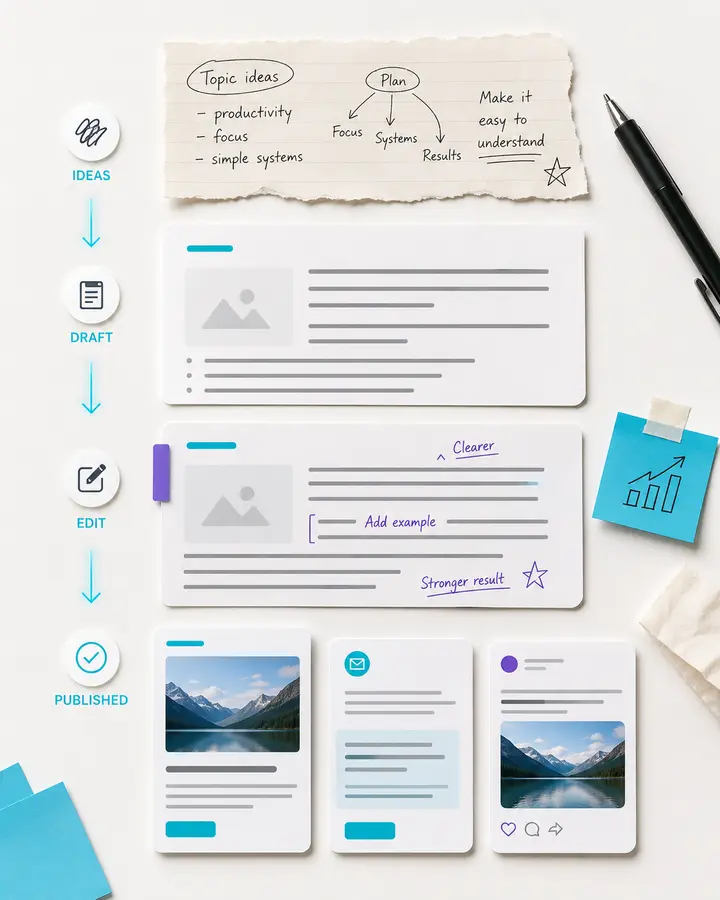
AI content generation covers tools that produce or transform written content — and sometimes accompanying visuals — from an input such as a topic, a brief, or a piece of existing text. These tools generate output by predicting likely words and structures based on patterns learned from large amounts of training data, not by understanding your business or audience the way a person would. For background on how this kind of generation works more broadly, see K44’s beginner’s guide to generative AI.
This is closely related to AI video generation and AI automation, but distinct from both. AI video generation focuses on moving images rather than text. AI automation, covered in K44’s beginner’s guide to AI automation, focuses on connecting triggers and actions across tools rather than generating content itself. AI content generation sits specifically in the space of drafting, editing, condensing, and reshaping written material.
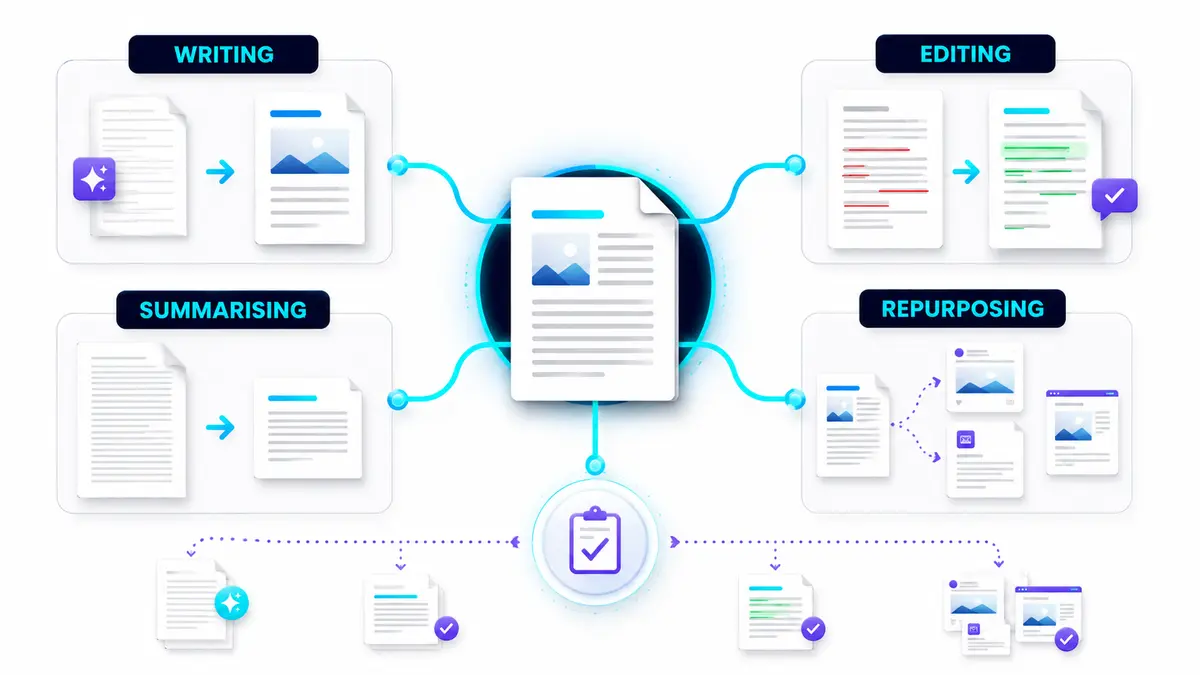
AI Writing, Editing, Summarising and Repurposing — What’s the Difference?
These four terms get used loosely, but they describe genuinely different jobs.
AI writing
AI writing creates a new draft from scratch, based on a topic, brief, or prompt you provide. Nothing existed beforehand — you’re asking the tool to generate original text. ChatGPT is a widely used example here: its official site describes helping users “write” and “create” as part of its general-purpose capabilities, making it a flexible option for brainstorming, drafting, and rewriting across many types of content. Claude is also built for this, with a particular strength in longer, more structured writing — Anthropic’s own support documentation describes a context window large enough to hold roughly 500 pages of text in a single conversation, and Anthropic’s official product announcements describe customisable writing styles (formal, concise, or explanatory) to match a specific voice.
AI editing
AI editing takes text you’ve already written and improves it — fixing grammar, tightening sentences, or adjusting tone — without starting from nothing. Grammarly is the clearest example: its official site describes helping users get suggestions “that help you strike the right tone without losing your authentic voice,” alongside grammar, clarity, and paragraph-rewrite features aimed specifically at refining existing text rather than generating it from scratch.
AI summarising
AI summarising condenses a longer piece of source material — an article, report, or transcript — into a shorter version that captures the key points. Several general-purpose tools, including ChatGPT and Claude, can perform this as one of their built-in capabilities alongside drafting and editing, and Claude’s large context window makes it well suited to summarising particularly long source documents in one go.
AI repurposing
AI repurposing adapts one piece of content into a different format — turning a blog post into social captions, or a long article into a short summary for a different channel. Jasper is built with this kind of workflow in mind for marketing content specifically: its official site describes itself as an “always-on content engine” that helps teams move from one asset to many, maintaining a consistent brand voice and tone across formats as content gets adapted for different channels.
| Workflow | Starting material | Typical result | Beginner use case |
|---|---|---|---|
| AI writing | A topic or brief | A new draft of text | First-draft product description or blog intro |
| AI editing | Text you already wrote | A polished, corrected version | Tightening a customer email before sending |
| AI summarising | A long document, article, or transcript | A short, condensed version | Turning a long report into a quick internal update |
| AI repurposing | One existing piece of content | Content adapted into a new format | Turning a blog post into social captions |
Common Beginner and Small-Business Use Cases
- First-draft blog posts — a starting structure and draft you then edit and fact-check.
- Social media captions — short, on-brand text adapted from a longer piece of content.
- Product descriptions — a first pass at describing a product’s features and benefits.
- Email and newsletter drafts — a structured starting point for routine business communication.
How to Pick a Safe First Content Task
The safest first task is:
- Low-stakes — nothing serious happens if the draft needs heavy editing.
- Easily fact-checked — you can quickly verify anything factual it contains.
- Free of legal, medical, or financial claims — these require professional accuracy AI can’t guarantee.
- Reversible — you can rewrite or bin the draft before it goes anywhere.
What you already have on hand is a useful guide to which workflow to try first:
- Nothing written yet, just an idea? Start with AI writing — give it a topic and brief and see what draft comes back.
- Already have a rough draft that needs polishing? Start with AI editing — let the tool tighten grammar, clarity, and tone rather than generating anything new.
- Sitting on a long document, article, or transcript? Start with AI summarising — condense it into a short version you can actually use.
- Have a finished piece that needs a different format? Start with AI repurposing — adapt it into a caption, snippet, or shorter version for another channel.
A simple process to find yours:
- List two or three pieces of content you write regularly (captions, product blurbs, internal updates).
- Cross out anything involving legal, medical, financial, or safety claims.
- Match what you’re starting with — nothing, a rough draft, a long document, or finished content — to the workflow above.
- Try that one workflow rather than several at once.
- Read the result fully and edit it before using it anywhere public.
The K44 Content-Prompt Formula
Topic + Audience + Tone + Format + Length
Build this up in stages:
- Beginner: Topic + Audience + Tone — describe what it’s about, who it’s for, and how it should sound.
- Add structure: Format + Length — specify what shape the content should take and roughly how long.
- Commercial: Key points + Call to action — add the specific details it must include and what you want the reader to do next.
Completed example — a Belfast independent bookshop promoting a weekend author event:
Beginner stage:
A social media caption about our weekend author event, for local book-lovers and regular customers, in a warm and welcoming tone.
Full version:
A social media caption about our weekend author event, for local book-lovers and regular customers, in a warm and welcoming tone, as a short Instagram caption, around 40–60 words, including the author’s name, the event date and time, and that seats are limited, ending with a call to action to reserve a spot in-store or by phone.
Generate the simple version first, check that the tone and structure feel right, then add the specific details and call to action. Exact names, dates, prices, or other facts should always be checked against your own records before publishing, since AI-generated drafts can get these details wrong even when the writing sounds confident.
Human Review, Accuracy, Originality and Disclosure
Every AI content draft should go through the same basic checks before it’s used:
- Factual verification — check names, dates, prices, and any claims made in the draft against your own accurate records.
- Originality review — AI-generated text isn’t guaranteed to be unique; read it critically and rewrite anything that feels generic or too close to something you’ve seen elsewhere.
- Tone and brand review — make sure the voice matches how your business actually talks to customers.
- Human editing before publication — treat every AI draft as a starting point, not a finished piece.
On disclosure: whether you need to label content as AI-assisted varies by platform, publisher, audience, and jurisdiction — there’s no single universal rule. Google’s own guidance on Search, for instance, states that “appropriate use of AI or automation is not against our guidelines,” and that content is evaluated on its quality rather than how it was produced — while still expecting accuracy and giving readers context about how content was created where relevant. Other platforms set their own rules for other formats. It’s worth checking the specific current guidance that applies to where you’re publishing, rather than assuming one rule covers every situation.
Common Beginner Mistakes
- Publishing a first draft unedited — skipping the read-through and fact-check step.
- Trusting factual claims without checking — names, dates, and figures can be wrong even in fluent, confident-sounding text.
- Using AI for anything requiring professional accuracy — legal, medical, or financial content needs a qualified person, not just an editing pass.
- Relying on one tool for every content type — writing, editing, summarising, and repurposing are different jobs, and different tools suit each one.
For a fuller comparison of current tools, see K44’s AI Content Generation Tools page.
Key Takeaways
- AI content generation covers four distinct workflows: writing, editing, summarising, and repurposing.
- AI writing creates a new draft; AI editing improves existing text; AI summarising condenses source material; AI repurposing adapts content into a new format.
- Tools like ChatGPT, Claude, Jasper, and Grammarly each suit a different part of this process.
- Every AI-generated draft needs a check for factual accuracy, originality, and tone before publishing.
- Disclosure expectations vary by platform, publisher, and jurisdiction — check what applies to where you’re publishing.
Frequently Asked Questions
Is AI content generation the same as AI writing?
Not quite. AI writing is one workflow within AI content generation — specifically, creating a new draft from scratch. AI content generation also includes editing, summarising, and repurposing, which start from existing text rather than a blank page.
Will AI-generated content be flagged as unoriginal?
Rather than worrying about detection, focus on what you can control: reading every draft critically, rewriting anything that feels generic, checking facts, and making sure the final piece genuinely reflects your own voice and adds value for your reader. Content that’s been properly reviewed and edited holds up regardless of how it started.
Do I need to disclose that content is AI-generated?
It depends on the platform, publisher, audience, and jurisdiction — there isn’t one universal rule. Check the current guidance that applies to wherever you’re publishing.
What’s a good first content task to try?
Something low-stakes and easy to fact-check, like a social media caption or a first-draft product description, rather than anything involving legal, medical, or financial claims.
Can AI content generation create images or video too?
Some tools extend into images and video, but this guide focuses on text-based content. See K44’s AI Video Generation beginner’s guide for the video side of AI generation.
How much should I edit AI-generated content before publishing?
Enough to have genuinely checked it — verifying facts, adjusting tone to match your brand, and rewriting anything that feels generic. Treat every AI draft as a starting point rather than a finished piece.
Ready to try it yourself? Explore K44’s AI Content Generation Tools page to find a tool that matches your first task.