
AI automation is automation where a system interprets, classifies, or generates something from the information it’s given, rather than only following a fixed rule. Instead of “if this happens, do that,” it can read a message, work out roughly what it’s about, and produce a sensible next step — which a person then checks. It sits between simple rule-based automation and an AI agent, which pursues a broader goal across several steps. The safest way to start is picking one small, reversible task and reviewing every output before trusting it further.
If you’ve heard the phrase “AI automation” and felt slightly lost, you’re not alone. Most small-business owners already use some form of automation — an email that sends itself when someone fills in a form, a spreadsheet that updates automatically. AI automation is the next step up: instead of only following instructions, part of the process also involves working out what something means.
This guide explains what AI automation actually is, how it’s different from a plain automation and from an AI agent, and how to choose a low-risk first task to try it on yourself.

What Does “AI Automation” Actually Mean?
A traditional automation follows a fixed rule: if X happens, do Y. It never has to interpret anything — it just matches a trigger to an action. That’s useful, but it’s rigid. It breaks the moment something doesn’t fit the rule exactly.
AI automation adds a layer of interpretation to one or more steps in that process. Instead of matching an exact keyword, it can read a customer’s message, classify roughly what they’re asking for, and generate the most relevant response or action — based on patterns in the data it’s been trained on and the context it’s given, not on independent judgement.
Think of it like the difference between a filing clerk who sorts letters by the colour of the envelope, and one who opens the letter, works out what it says, and decides which drawer it belongs in based on the content. Both are doing “automation.” Only one is doing something you’d call AI.
How an AI Automation Actually Works: Trigger → AI Task → Action → Human Review
Most AI automations follow the same basic shape, made up of four stages:
- Trigger — something happens that starts the process. For example, a new email arrives in your inbox.
- AI task — the AI interprets that input. For example, it reads the email and classifies it as a customer asking about a late delivery.
- Action — the system does something with that classification. For example, it drafts a reply explaining the delay and offering an update.
- Human review — a person checks the result before it goes any further. For example, you glance at the drafted reply, tweak a sentence, and hit send.
That last stage matters more than people expect. A well-built AI automation doesn’t remove you from the loop for anything that carries real consequences — it removes the boring, repetitive part and leaves the final call with you.
Worked example — a customer enquiry: A visitor fills in your website’s contact form asking whether you deliver to their area (trigger). An AI step reads the message and generates a draft reply confirming your delivery zones, pulled from information you’ve supplied it (AI task). The draft is placed in your inbox as an unsent reply, ready to go (action). You read it, correct a detail about a postcode, and send it yourself (human review). Nothing reaches the customer until you’ve approved it.
Simple Automation vs AI Automation vs AI Agents
These three terms get mixed up constantly, so here’s how they actually differ.
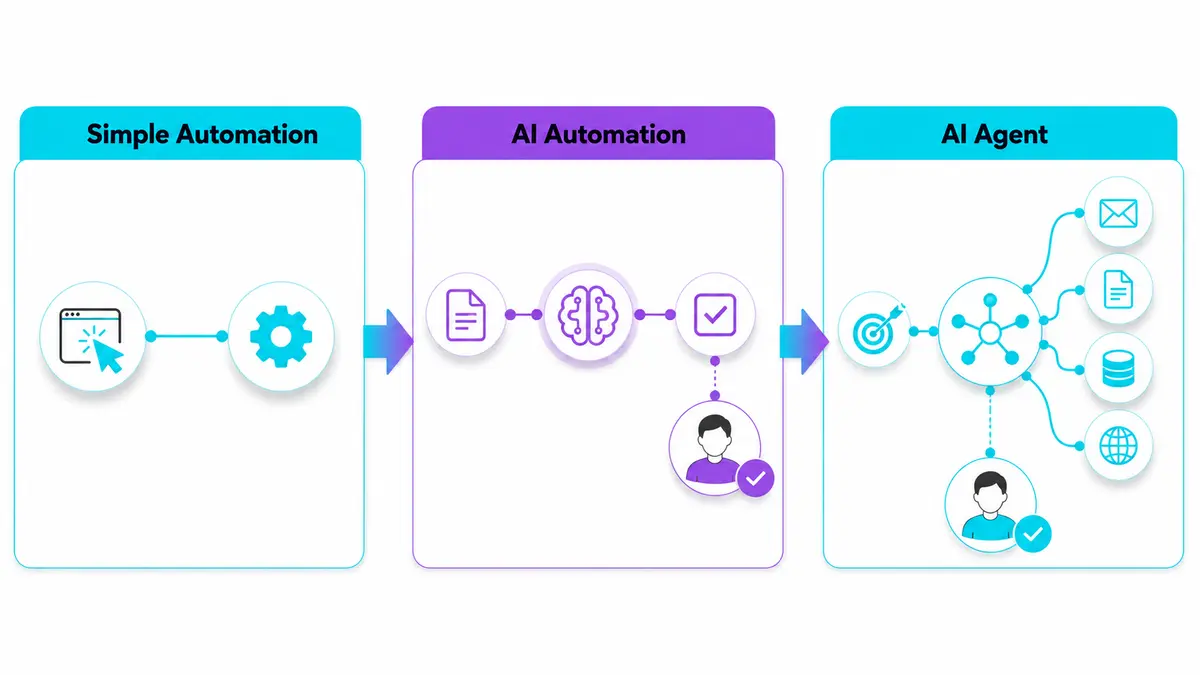
Simple automation follows fixed rules with no interpretation involved. A classic example is an email filter that moves anything from a specific sender straight into a folder — useful, predictable, and unable to handle anything it wasn’t explicitly told to expect.
AI automation adds interpretation to a specific step, while the rest of the process usually still follows a defined workflow. An example is a system that reads an incoming customer email, classifies whether it’s a complaint, a question, or a compliment, and routes it accordingly — before a person reviews the result.
AI agents are generally more goal-directed. Rather than performing one interpreted step inside a fixed workflow, an agent can be given a broader goal and select from a set of tools to carry out a short sequence of actions towards it — for example, researching a topic, drafting a summary, and updating a shared document, within permissions a person has set. Exactly what counts as an “agent” varies between providers and products, but most are still expected to report back for human review rather than act with no oversight at all.
| Type | What it does | Example | Who remains in control |
|---|---|---|---|
| Simple automation | Follows a fixed rule with no interpretation | Move emails from one sender into a folder | The rule you wrote |
| AI automation | Interprets one step, then follows a set process | Read an email, classify its topic, route it correctly | You, reviewing the result |
| AI agent | Works toward a goal across multiple steps using tools, within set permissions | Research a topic, draft a summary, update a document | You, setting permissions and reviewing the outcome |
For more on how interpretation fits into this, see K44’s beginner’s guide to generative AI.
Everyday Examples a Beginner Will Recognise
- Inbox triage — sorting incoming emails into “urgent,” “general enquiry,” or “spam” based on their content, not just the sender.
- Customer FAQ replies — drafting a first-pass answer to a common customer question, ready for you to check and send.
- Invoice and receipt sorting — reading a scanned invoice and pulling out the supplier name, amount and date automatically.
- Social post drafting — turning a short bullet-point brief into a first-draft caption, which tools such as those on K44’s AI Content Generation Tools page are designed to help with, ready for you to edit before posting.
None of these need to run unsupervised. In each case, the AI produces the tedious first pass; you make the final call.
Why Small Businesses Are Using This Now
Small teams rarely have spare hours for repetitive admin. AI automation is attractive because it takes on the tedious first pass of a task — reading, sorting, drafting — without needing a developer to build custom rules for every scenario.
A few current tools built around this idea include Zapier, Make, Lindy and n8n. Broadly: Zapier is a widely-connected, trigger-and-action platform with AI features layered on top; Make is a similar visual, drag-and-drop automation platform that also supports building AI agents on its canvas; Lindy positions itself as an AI teammate you instruct in plain language across chat tools like Slack, rather than building a flow by hand; and n8n is a workflow automation platform aimed at technical teams, combining a visual canvas with the option to write custom code, and it can be self-hosted. Each takes a different approach, and none is a universal “best” choice — the right one depends on your technical comfort and the task at hand. You can compare current options on K44’s AI Automation Tools page.
Used well, this doesn’t replace staff judgement on anything that matters — it clears the repetitive groundwork so people can spend time on the parts that need a human.
What Data Should You Avoid Automating First?
Not every task is equally safe to hand over, and this matters as much as picking a low-stakes task in the first place. Be cautious about connecting an AI automation to anything involving sensitive personal information — health details, personal identification numbers, or anything about your customers you wouldn’t want exposed if a step misfired.
The same goes for financial details: bank information, card numbers, and payment data are best kept out of your first automation entirely, even if the tool advertises secure handling. Never place raw passwords, API keys or other secrets inside prompts or ordinary workflow fields. Use the platform’s secure credential or OAuth connection method. Confidential customer data — contracts, private communications, anything covered by a confidentiality agreement — deserves the same caution.
Legal or contractual decisions, such as approving terms, agreeing to a contract, or making a commitment on the business’s behalf, should stay with a person, not an automated step, however well-drafted the AI’s output looks.
Before connecting any automation to your existing tools, check exactly what permissions it’s asking for and grant only what the task genuinely needs. Share the minimum data required to complete the step, rather than connecting a whole inbox or database when only one field is needed. And keep a human review step in place until you’ve seen the automation handle real cases reliably over time — sensitive categories like these are exactly where an unreviewed mistake is hardest to undo.
How to Pick Your First Safe Task to Automate
The safest first task is:
- Low-stakes — nothing breaks badly if the AI gets it slightly wrong.
- Reversible — you can undo or correct the output before it causes a problem.
- Reviewable — you can easily check the result before it goes anywhere final.
- Repetitive — it’s something you or your team do often enough that automating it actually saves time.
A simple process to find yours:
- List three repetitive tasks you or your team do every week.
- Cross out anything involving money, legal commitments, or the sensitive data types above.
- Pick the task where a mistake would just mean “redo it,” not “damage control.”
- Set it up with a human-review step before anything is sent, published, or filed.
- Run it for a week, checking every output, before considering removing that review step.
Common Mistakes Beginners Make
- Starting with something high-stakes — like customer refunds or contract terms — before understanding how the tool behaves.
- Skipping the human review step — trusting the first draft to go out unchecked.
- Assuming the output is always correct — AI-generated drafts still need a sense-check, especially for facts, figures or tone.
- Trying to automate everything at once — one working automation beats five half-finished ones.
Key Takeaways
- AI automation interprets one step in a process — reading, classifying or generating — rather than just matching fixed rules.
- The core shape is trigger → AI task → action → human review.
- Simple automation, AI automation, and AI agents differ mainly in how much interpretation and how many steps they cover.
- Tools like Zapier, Make, Lindy and n8n each take a different approach; none is a universal best fit.
- Choose a low-stakes, reversible task, avoid sensitive data types on your first attempt, and keep a human check on the output.
Frequently Asked Questions
Is AI automation the same as an AI agent?
No. AI automation typically adds interpretation to one step inside an otherwise fixed process. An AI agent works toward a broader goal across multiple steps and tools, generally within permissions a person has set, and terminology for what counts as an “agent” still varies between providers.
Do I need to know how to code to use AI automation?
Not for most beginner use cases. Tools like Zapier, Make and Lindy are built for non-technical users; n8n leans more technical, offering a visual canvas alongside the option to write custom code.
What’s the risk of getting it wrong?
The main risk is trusting an AI-generated output without checking it — especially for anything involving customers, money, sensitive data or public communication. Starting with a low-stakes, reviewable task keeps this risk small.
What’s a good first task to try this week?
Something repetitive and low-stakes, like drafting first-pass replies to common customer questions or sorting incoming emails by topic — always with a human checking the result before it goes anywhere final.
Will this replace my staff?
Used sensibly, it’s designed to remove repetitive groundwork, not replace judgement on anything that matters. The tasks worth automating first are the ones nobody enjoys doing anyway.
Ready to see this in action? Explore K44’s AI Automation Tools page to find a beginner-friendly first automation to try.